YouTube chapters usually do not show because the timestamps are formatted incorrectly, the first timestamp does not start at 0:00, there are fewer than 3 chapters, or one of the chapters is too short. But formatting is not the whole story. In my own testing, valid chapters still did not appear until my YouTube account had Advanced Features enabled.
If you want to avoid the formatting work, you can generate YouTube chapters automatically with AI here
My story
When I built the first version of Chapters Generator and started testing generated timestamps on my own YouTube channel, I expected the chapters to appear right away. They did not appear on any of my videos, even though the generated chapter format matched the format used by other creators.
That forced me to investigate beyond the usual timestamp rules. I checked Reddit, YouTube discussions, and creator forums, then tested the fixes on my own channel. Some issues were simple formatting problems. One issue was not: in my case, YouTube chapters started working only after I enabled Advanced Features on my YouTube account by completing identity/video verification.
Quick answer
YouTube chapters normally need a timestamp list in the video description that starts at 0:00, includes at least 3 timestamps, and keeps each chapter at least 10 seconds long. If the format is correct and YouTube chapters are still not showing, check account-level issues too: Advanced Features, phone verification, possible subscriber limitations, and whether external links are interfering with the description.
A valid YouTube chapter list can look like this:
0:00 Introduction
1:18 Main problem
3:42 Step-by-step solution
6:55 Common mistakes
9:10 Final tips
What are YouTube chapters?
YouTube chapters are clickable sections inside a YouTube video that let viewers jump to a specific moment. YouTube chapters are created from timestamps in the video description or generated automatically by YouTube when automatic chapters are available. For creators, YouTube chapters make long videos easier to scan, search, and reuse.
YouTube chapters are especially useful for:
- tutorials;
- podcasts;
- webinars;
- product reviews;
- educational videos;
- interviews;
- long walkthroughs.
Google also describes video key moments as a way for users to navigate video segments like chapters in a book. For YouTube-hosted videos, Google can use timestamps and labels from the YouTube description as one way to understand those moments.
What is the correct YouTube timestamp format?
The correct YouTube timestamp format starts with the time, then a short chapter title. The first chapter should start at 0:00, and the rest of the timestamps should appear in chronological order. A simple format like “0:00 Introduction” is usually safer than a complex format with extra symbols, links, or decorative text.
Use this format:
0:00 Introduction
1:24 Why chapters matter
3:10 How to add timestamps
5:45 Common errors
8:20 Final checklist
Avoid this format:
Intro - 0:00
🔥 1:24 - Why chapters matter!!!
[3:10] https://example.com/how-to-add-timestamps
Chapter four: 5:45
The second example may still create clickable timestamps, but it is less clean for YouTube chapter detection.
Why does the first timestamp need to start at 0:00?
The first YouTube chapter should start at 0:00 because YouTube uses the first timestamp as the beginning of the chapter structure. If the first timestamp starts later, YouTube may treat the timestamps as normal clickable links instead of a full chapter list. Starting at 0:00 is the easiest first check when chapters do not appear.
A good first chapter does not need a creative title. It can be simple:
0:00 Introductionor:
0:00 What this video coversThe title should describe the opening section clearly enough for a viewer to know what happens there.
How many timestamps do YouTube chapters need?
YouTube chapters usually need at least 3 timestamps in the video description. If a video has only 1 or 2 timestamps, YouTube may show them as clickable moments but not turn them into visible chapters on the video timeline. Add at least 3 useful sections before checking anything more technical.
Bad example:
0:00 Intro
4:30 Main topic
Better example:
0:00 Intro
1:15 Main topic
4:30 Example
7:05 Summary
For long educational videos, 5-12 chapters often feel more useful than 3 huge sections. For very detailed tutorials, more chapters can work if the chapter titles stay clear.
Can a YouTube chapter be too short?
A YouTube chapter should usually be at least 10 seconds long. If one chapter is shorter than 10 seconds, YouTube may ignore the chapter structure or fail to show chapters correctly. Very short chapters also make the video timeline harder to use, especially on mobile.
Check for timestamps that are too close together:
0:00 Intro
0:06 Tool overview
0:11 Setup
A cleaner version would be:
0:00 Intro and tool overview
0:25 Setup
1:40 First example
If a section is only a few seconds long, merge it with the previous or next chapter.
Can links in the description break YouTube chapters?
Links in a YouTube description can make chapter detection messier when the timestamp list is mixed with URLs, affiliate links, or promotional blocks. YouTube can still support descriptions with links, but the safest approach is to keep the chapter list clean, visible, and separate from other links.
A safer structure is:
Chapters:
0:00 Introduction
1:18 Main problem
3:42 Step-by-step solution
6:55 Common mistakes
9:10 Final tips

Links:
Website: https://example.com
Newsletter: https://example.com/newsletter
Do not place external links between timestamp lines if you want the chapter list to be easy for YouTube and Google to parse.
Why are automatic YouTube chapters not showing?
Automatic YouTube chapters may not show because YouTube does not generate automatic chapters for every video. Automatic chapters depend on the video, the channel, the audio, the language, and YouTube’s own processing. A creator can still add manual YouTube chapters by placing valid timestamps in the video description.
This matters because creators often wait for YouTube to create chapters automatically when the faster option is to add clear manual timestamps.
Manual YouTube chapters give creators more control over:
- chapter titles;
- section boundaries;
- important keywords;
- how the video is understood by viewers;
- which parts of the video deserve attention.
If automatic chapters are missing or poor quality, use manual timestamps instead.
Do YouTube Advanced Features affect chapters?
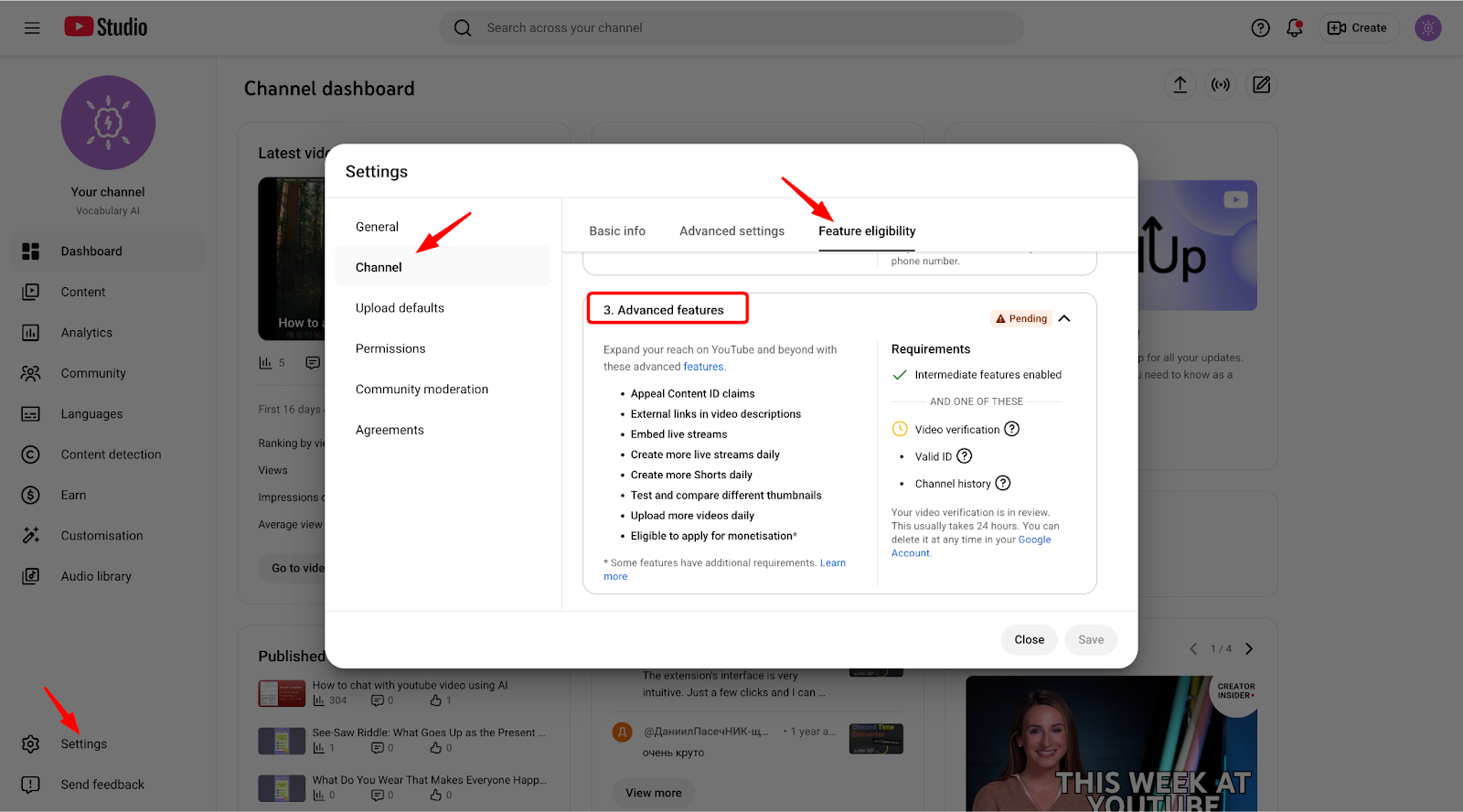
YouTube Advanced Features can affect chapters on some channels. This is the fix that helped in my own testing: the timestamp format was valid, but YouTube chapters did not appear until Advanced Features were enabled on the account. YouTube may ask for ID verification, video verification, or enough channel history before enabling these features.
This is not the first thing to check. First, fix the timestamp list. But if the chapter format is clean and chapters still do not appear across several videos, check this path:
- Open YouTube Studio.
- Go to Settings.
- Open Channel.
- Check Feature eligibility.
- Look for Advanced Features.
- Complete the requested verification if Advanced Features are disabled.
In my case, this was the missing step.
Can subscriber count affect YouTube chapters?
Some creators report that YouTube chapters work more reliably after a channel has more than 1,000 subscribers, but this does not behave the same way for every channel. This point is not officially confirmed as a universal rule. Treat subscriber count as a possible eligibility signal, not as the first diagnosis.
The practical order is:
- Fix the timestamp format.
- Use at least 3 chapters.
- Keep each chapter at least 10 seconds long.
- Use colon-based timestamps like 0:00 or 00:00.
- Move external links away from the chapter list.
- Verify the YouTube account by phone.
- Enable YouTube Advanced Features.
If all of that is done and chapters still do not appear, the issue may be channel-level eligibility or YouTube processing.
Can YouTube chapters work without subtitles?
YouTube chapters can work without existing subtitles if the creator adds valid timestamps to the video description. Subtitles are helpful for understanding the video, but manual YouTube chapters are based on the timestamp list. An AI chapter generator can transcribe or analyze the video first, then create timestamps even when YouTube subtitles are missing.
This is one of the main reasons I built Chapters Generator. A lot of good videos have no subtitles yet, but the creator still needs chapters now, not later.
You can generate YouTube chapters without existing subtitles here: https://addchaptersyt.video/
Checklist: how to fix YouTube chapters not showing
Use this checklist before changing the whole description:
| Check | What to look for | Fix |
|---|---|---|
| First timestamp | The list starts later than 0:00 | Start the first chapter at 0:00 |
| Chapter count | Only 1-2 timestamps | Add at least 3 timestamps |
| Chapter length | Two timestamps are less than 10 seconds apart | Merge or move short chapters |
| Timestamp separator | Timestamps use dots, dashes, or text instead of colons | Use a colon format like 0:00, 00:00, or 1:02:30 |
| Timestamp order | Times are not chronological | Put timestamps in video order |
| Formatting | Titles are messy or filled with symbols | Use “0:00 Chapter title” |
| Links | URLs appear between timestamp lines | Move links below the chapter list |
| Account features | YouTube Advanced Features are not enabled | Enable Advanced Features in YouTube Studio |
| Account verification | The YouTube account is not verified by phone | Verify the YouTube account with a phone number |
| Subscriber/account eligibility | The channel is small and chapters still do not appear | Check whether chapters work after account verification and Advanced Features |
| Visibility | Timestamps are buried deep in the description | Put chapters near the top |
| Processing | You just saved the description | Wait a few minutes and refresh |
Most chapter problems are format problems. Fix the simple rules first.
Manual timestamps vs AI-generated YouTube chapters
Manual YouTube timestamps work well when the video is short or the creator already knows the structure. AI-generated YouTube chapters are better when the video is long, has no subtitles, or contains many topic changes. The best result is usually AI-generated chapters reviewed by a human before publishing.
| Method | Best for | Weak point |
|---|---|---|
| Manual timestamps | Short videos and simple tutorials | Slow for long videos |
| YouTube automatic chapters | Creators who do not want to edit anything | Quality and availability are inconsistent |
| AI chapter generator | Long videos, missing subtitles, repeat workflow | Final titles should still be reviewed |
For creators who publish often, manual timestamp writing becomes boring fast. That is where an AI YouTube chapter generator is useful.
How to generate valid YouTube chapters automatically
You can generate valid YouTube chapters automatically by pasting a YouTube video URL into an AI chapter generator, choosing the detail level, and copying the timestamp list into the video description. Chapters Generator creates chapter titles with timestamps and can work even when a video does not already have YouTube subtitles.
The workflow is simple:
- Open https://addchaptersyt.video/
- Paste the YouTube video URL.
- Choose Basic, Medium, or Detailed chapters.
- Generate the timestamp list.
- Copy the chapters into the YouTube description.
- Save the video description and check the video page.
The Chrome extension is useful if you want to generate chapters while staying on YouTube: https://chromewebstore.google.com/detail/add-chapters-to-youtube-v/fpmnjboggaaohkleboajbmhelfjeficd
FAQ
Why are my YouTube timestamps clickable but chapters do not appear?
YouTube timestamps can be clickable even when YouTube chapters do not appear on the timeline. This often happens when the first timestamp does not start at 0:00, there are fewer than 3 timestamps, one chapter is shorter than 10 seconds, or the YouTube account is missing required eligibility features.
Do I need YouTube Advanced Features for chapters?
YouTube Advanced Features may be required for chapters to work on some channels. In my own testing, valid generated timestamps did not turn into visible YouTube chapters until Advanced Features were enabled through YouTube account verification.
Do I need 1,000 subscribers for YouTube chapters?
Some creators report that YouTube chapters start working only after a channel has more than 1,000 subscribers, but this is not a confirmed rule for every channel. If your channel is small, check formatting, phone verification, and Advanced Features before assuming subscriber count is the only reason.
How long does it take for YouTube chapters to appear?
YouTube chapters can appear within a few minutes after saving the description, but processing time can vary. If the format is correct, refresh the video page and check again later before rewriting everything.
Do YouTube chapters help SEO?
YouTube chapters can help viewers and search systems understand the structure of a video, and Google can show video key moments in search results. YouTube chapters do not guarantee higher rankings, but they can make a video easier to navigate and easier to match with specific searches.
Can I add YouTube chapters after publishing a video?
Yes, creators can add YouTube chapters after publishing a video by editing the video description and adding valid timestamps. The video does not need to be reuploaded.
Can I use AI to create YouTube chapters?
Yes, an AI chapter generator can analyze a YouTube video, create a timestamp list, and suggest chapter titles. The creator should still review the final chapter titles before adding them to the video description.
What is the easiest way to fix chapter formatting?
The easiest way to fix chapter formatting is to regenerate the chapter list in a clean format: 0:00 first, at least 3 chapters, each chapter at least 10 seconds long, and no links between timestamp lines.
Final recommendation
If YouTube chapters are not showing, do not rewrite the whole video description first. Check the simple rules: 0:00 first, at least 3 timestamps, 10+ seconds per chapter, colon-based timestamps, clean chapter titles, and no links between chapter lines. If the format is correct and chapters still fail, check phone verification and YouTube Advanced Features next.
If you want to skip the manual cleanup, generate valid YouTube chapters automatically here: https://addchaptersyt.video/
Internal links to add when the next articles are published
- Link to: /how-to-add-chapters-to-youtube-videos
- Link to: /youtube-timestamp-format
- Link to: /youtube-chapters-seo
- Link to: /generate-youtube-chapters-without-subtitles
Source notes for editor
- Google Search Central says key moments help users navigate video segments like chapters in a book and that for YouTube-hosted videos, exact timestamps and labels can be specified in the YouTube description.
- YouTube Help page for Video Chapters should be used as the canonical reference for chapter formatting rules.
- User-tested project fact from Vitalii: valid generated chapters did not appear on his own channel until YouTube Advanced Features were enabled through account verification.
- Community/forum-reported issues to describe carefully, not as universal official rules: possible 1,000 subscriber threshold, external links interfering with chapters, and missing phone verification.