Chapters, thumbnails, and cards on YouTube videos: what helps your viewer the most?
Every time I upload a new video to YouTube, I think about three key elements that shape the viewing experience even before someone presses play and while they are watching the video:
1. Thumbnails
2. Cards
3. Chapters
All three elements are powerful on their own, but they serve different purposes at different stages of the viewer’s journey.
Understanding when and how each one helps your viewer is essential if you want to create videos that are not only watched, but also enjoyed and used the way you intended.
Let’s break it down.
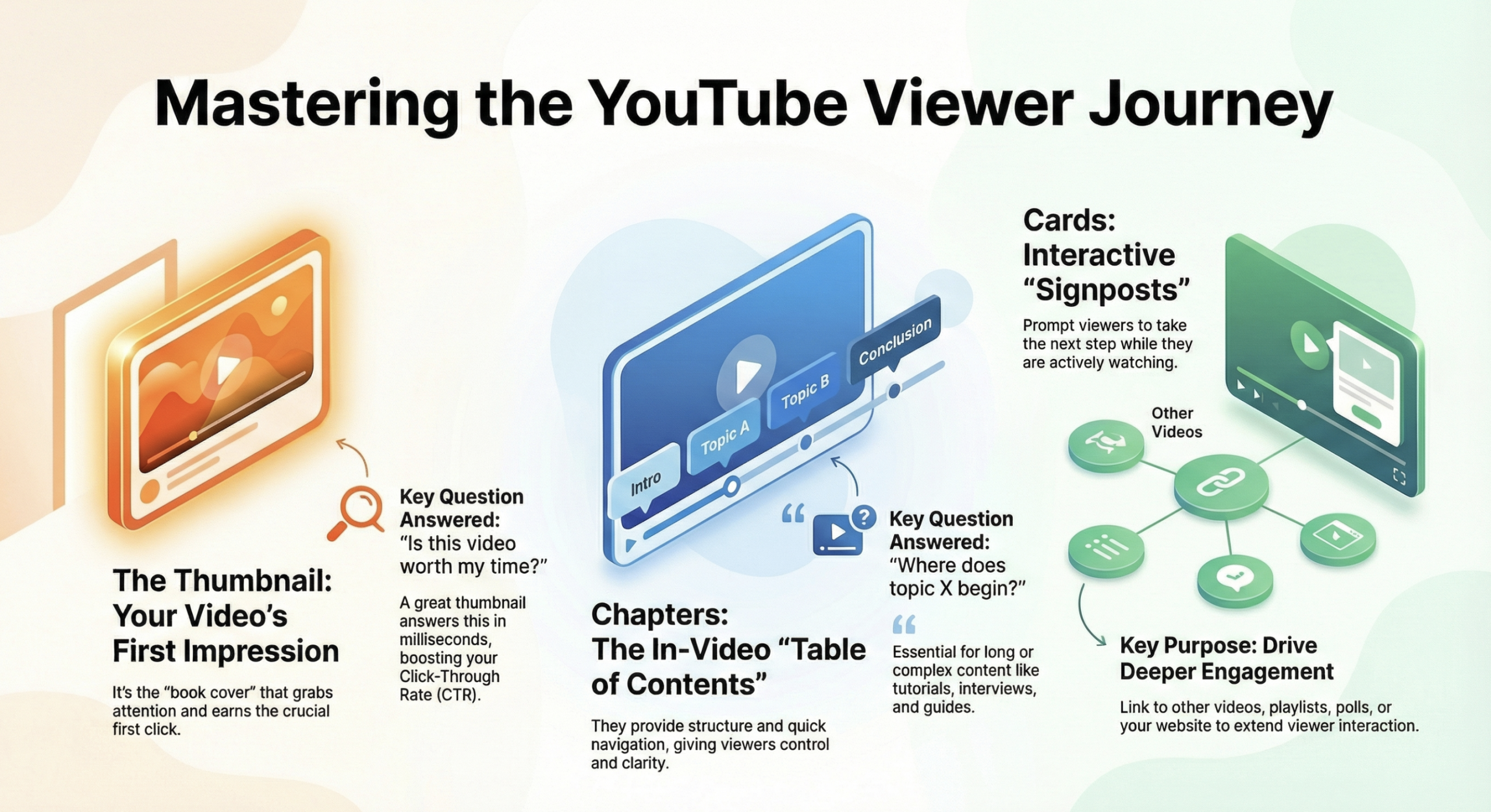
1. Thumbnails – your viewer’s first impression
Imagine walking past a row of bookstores.
A thumbnail is the cover of your video.
It’s the first thing people see long before the title, description, or chapters. A good thumbnail:
✔ Grabs attention in a split second
✔ Gives a visual hint about what the video is about
✔ Sets expectations for the viewer
✔ Triggers the first click
✔ Can significantly increase your CTR (click-through rate) if done well
Think of thumbnails as the spark that makes people stop.
They don’t tell the whole story, but if they fail, most people will never give your video a chance to tell it.
Great thumbnails answer this question in milliseconds:
“Is this video worth my time?”
But there’s a limitation: thumbnails help before the viewer starts watching.
Once playback begins, thumbnails disappear and their job is done.
2. Cards – interactive hints during playback
YouTube cards are small interactive elements you can place during a video to guide viewers where you want them to go – whether that’s:
➤ Another relevant video
➤ A playlist
➤ A poll
➤ A link to your website or an affiliate product
➤ A prompt to subscribe
Cards are about action, not just attention.
They increase engagement during the video by encouraging viewers to do something instead of just passively consuming content.
They work best when:
✔ You want to guide viewers to more content
✔ You want to increase watch time across multiple videos
✔ You want to encourage interaction or participation
In a way, cards are like signposts in a game, they help viewers go deeper into your channel’s world.
However, they only appear during playback and cannot structure the content itself.
They are supporting elements, not organizers.
3. Chapters – the foundation of content navigation
Now let’s talk about something less flashy for grabbing attention, but incredibly important for viewers: video timestamps.
Unlike thumbnails or cards, chapters with timestamps help viewers inside the video itself by providing:
✔ Clear structure
✔ A table of contents
✔ Fast access to specific sections
✔ Easier navigation, especially in long videos
Chapters give viewers control and clarity, especially when your video covers multiple concepts, steps, or topics.
They answer an unspoken question:
“Where does topic X start?”
This is especially powerful for educational, instructional, long-form, and multi-topic videos:
⬥ Interviews
⬥ Tutorials
⬥ Webinars
⬥ Guides
Viewers can jump to exactly what they need — and many don’t watch chapters in order.
For these videos, chapters are not just a nice bonus - they are essential.
At which stage is each element most important?
| Stage | Most important element | Why |
| Discovery | Thumbnail | Drives the first click, increases CTR |
| Engagement during the video | Chapters with timestamps | Help viewers find what they need and improve the viewing experience |
| Action / retention after watching | Cards | Encourage deeper interaction with your channel and content |
Each of these elements plays a different, but complementary role in the viewer’s journey.
How they work together (a real-life example)
Let’s say you publish a 20-minute tutorial video:

1. The thumbnail makes them click.
Without an appealing thumbnail, your content may never be seen.

2. Chapters help them navigate the lesson.
They can jump to the part they need. This lets them watch longer and reduces frustration.

3. Cards guide them after watching.
After finishing the lesson, a card might suggest subscribing or watching part two.
Together, they help the viewer:
✔ Find the right video
✔ Watch what matters
✔ Do more after watching
Where does a chapter generator fit in?
Now imagine this process being automated.
You’ve already spent time filming, editing, and thinking about how to present your content.
The only remaining manual step in your workflow, structuring chapters shouldn’t take even more of your time.
This is where a YouTube timestamp generator comes in:
✔ Automatically analyzes your content
✔ Detects logical segmentation points
✔ Generates meaningful chapter titles
✔ Outputs timestamps ready to paste
This means you no longer have to guess how to name chapters or where they should start, AI does it for you consistently and reliably.
The result?
Faster publishing, better viewer experience, and a higher-quality final product without extra time costs.
So what helps your viewer the most?
There is no single “most important” feature, each serves its own unique purpose:
➤ Thumbnails grab attention
➤ Cards drive action
➤ Chapters improve understanding and navigation
If your goal is to create videos that truly help your audience, you need to think beyond one tactic and understand how these features work together.
When used thoughtfully, these three elements give viewers a clear, intuitive, and enjoyable viewing journey and help your content make a real impact.